Architecture
Architecture overview for DorkOS contributors
Architecture
This is the engineering reference. For a plain-language introduction, start with Architecture.
DorkOS has several deployment boundaries. The local React client reaches a Hono server through the Transport interface. The independent Community server owns shared channels. Cloud is optional and communicates through a public contract. The marketplace website helps people discover packages that the local server installs.
Reviewed against public source 996161118a84f938fe76b6e569ba077dfb7a574a on October 1, 2026. Spaces is the product name; Community remains the service and schema name. Solid diagram edges show implemented public paths, while dashed edges identify unfinished wiring or service-contract relationships. Neither establishes live deployment. Sequence-diagram dashed arrows represent responses and events.
System map

Browser, phone web app, and desktop renderer share the local server path. The desktop shell manages a local server.
Community has its own browser, sign-in, PostgreSQL, and file storage. Its browser chat, invitations, files, and exports are implemented. After a person approves a local installation, the local app opens authorized Community channels through qualified local-server routes and a remote-room SSE stream.
The main server now refuses new HTTP requests and WebSocket upgrades once shutdown begins. Already-admitted requests, streams and background work retain their existing lifetimes. Workspace reconciliation has bounded terminal disposal; the broader storage/lock/restart handoff is still a proposed design.
Projects and extension orchestration

A Git main checkout defines a project; its worktrees and subfolders resolve to that identity. Extensions can report roots, but those reports do not expand core discovery authority. One selected extension copy runs across projects. Source/origin-trusted project copies use immutable snapshots; explicitly path-approved copies run in place. Trusting a source and enabling it in a project are separate decisions.
Extensions contribute pages under /x/<extensionId>, status items and questions in Activity. Their browser and server callers start chats through the same core launch service, with persisted origin and shared start limits. Flow is an external marketplace plugin using these public seams. Claude Code account selection checks both account and project eligibility; equivalent project restrictions are not implemented for every runtime.
Connections uses one app list. Shared readiness explains what is usable and how to repair it; authorization still checks grants, access levels and per-chat choices. Chosen levels remain bounded as an app's operations change.
Executable contributions and document delivery
Owner-approved dev links load working folders and reload through a serial lane. Their provenance and consent remain distinct from installed copies. Extensions can supply guarded agent tools and skills; destructive tools always ask a person. An extension can also run in its own process with limits it declares; its tools then still pass the same permission check inside DorkOS.
Document channels persist notifications and recheck current grants before dispatch. Frame generation correlates the preview lifetime; it does not authenticate page scripts. Relay HTTP agent deliveries have a separate durable status resource. Accepted, delivered and successful agent work are different outcomes.
The new managed-browser engine is a fixture/research foundation. It is separate from previews and signed-in Playwright access, and is not activated in production startup.
Replaceable interfaces
A port is an interface in code; an adapter implements it. A port does not necessarily cross a network.

AgentRuntime selects an execution engine. ConnectorProvider handles account-backed service actions. RelayAdapter handles messaging. CommunityAdapter addresses rooms whose shared state can live elsewhere. MemoryProvider handles persistent agent notes. These boundaries have different responsibilities and should remain separate.
The local Community implementation is registered at startup. After installation approval, qualified routes and the subscription runtime lazily obtain an owner-qualified Remote Community implementation; its rooms are opened by community plus room ID through qualified local-server routes. GET /api/rooms still keeps per-caller local listing outside the port. Buzz has an implementation but no startup wiring.
Message and event paths
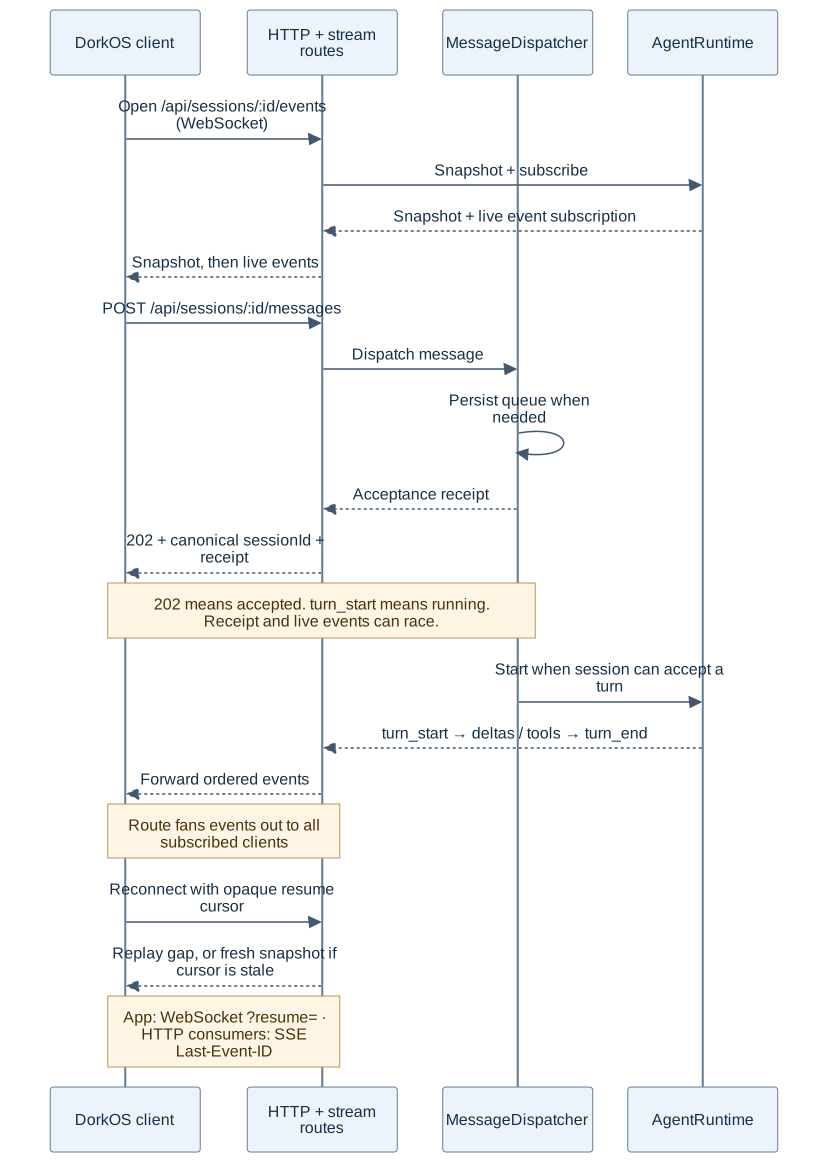
A message POST returns 202 with an acceptance receipt. It does not carry the reply or prove that a turn has begun. turn_start on the event stream marks execution. Busy chats queue messages durably.
| Boundary | Protocol |
|---|---|
| Client commands and queries | HTTP /api/* |
| Local app updates | WebSockets at /api/events, /api/sessions/:id/events, and /api/rooms/:id/events; SSE remains available at those paths |
| Terminal bytes | Separate WebSocket /api/terminal/:id/socket |
| Community browser updates | SSE /api/v1/communities/:communityId/channels/:id/events, alongside HTTP commands |
| Local server and Community | Approved-installation HTTP commands plus a qualified remote-room SSE stream |
| OpenCode runtime | Local SDK/HTTP sidecar calls plus a global SSE event subscription |
| External tools and agents | MCP Streamable HTTP at /mcp; A2A under /a2a |
WebSocket reconnection sends the opaque cursor as ?resume=; SSE uses Last-Event-ID. Replay falls back to a snapshot when the cursor is stale. See the protocol reference.
Community boundary

A Community host owns host-wide sign-in and tenant-scoped membership and posts. Canonical routes name the immutable community UUID; unqualified routes are compatibility aliases for a single-community host. Host operators and scoped machine keys manage containers, limits and usage without becoming members. Separately scoped takedown and evidence operations provide exceptional moderation access; host keys remain refused on ordinary tenant content routes. It does not execute agent turns. Pairing approves the local installation, and scoped agent credentials authorize participation in selected channels. Slack and Telegram bridges still project their chats and channels into local rooms through Relay.
Server-owned subscriptions continue independently of browser SSE readers. Local room mirrors support dispatch; Community remains authoritative. A durable outbox confirms remote posts and checks Stop and revocation before delivery. The community switcher changes scope without changing where agents execute.
Agent enrollment belongs to the approving installation grant, so disconnecting one computer does not remove another computer's agents. Authoritative deletion, takedown and revocation remove derived local mirrors and stop applicable work. An unexplained 404 is not proof that a community was deleted.
The host imports version 1, 2 and 3 owner exports through a worker into an unclaimed tenant. Historical members and agents do not receive live credentials; ownership requires a new claim. Whole-community takedown supports evidence retention and reversal to a suspended state. Owner replacement uses a scoped request, durable notices, a waiting period, objection and signed-in claim. Legal holds protect inventory-mapped files, while an IDs-only erasure journal can be copied off-server and reapplied after backup restore. These operator workflows need their own operational proof.
Runtime tools

Claude Code carries DorkOS tools in-process. Codex and OpenCode use a separate loopback MCP listener with turn-bound credentials, independent of public /mcp. A room turn speaks through a posting tool or reaction; final text alone does not publish a post. Signed-in agent browsers use their own managed MCP configuration and keep their website sign-ins saved locally; see the browser guide for verification limits.
Marketplace delivery

Source registries supply package metadata and content. The website browses them. Local installation validates packages, prepares permission previews, and uses a file transaction with rollback. Harness Sync projects agent-facing assets into the layouts the coding tools read; app extensions have their own activation path. Install/update/uninstall serialize per target; preserved backups never load as packages, ambiguous user files remain available for resolution, and failed activation preserves an existing connection. Startup project recovery currently enumerates Mesh agent projects rather than every known project. The install path is covered end to end, while full Claude Code marketplace superset compatibility remains unverified.
Cloud boundary

The public packages/cloud-api package defines schemas, routes, fixtures and a fetch client. Existing device-link, heartbeat and managed-service calls still use /api/auth/device/* and /api/instances/*; versioned clients use /v1. The older calls go to DORKOS_CLOUD_URL (default the website). The /v1 calls go to DORKOS_CLOUD_API_URL; unset, that follows a custom DORKOS_CLOUD_URL, and otherwise defaults to the Cloud service's own address, since the website has no /v1 routes.
The contract's remote command stream uses SSE and has lease/acknowledgement semantics. The existing local tunnel manager separately uses the ngrok SDK; the managed command consumer remains separate app-side work. Remote browser traffic travels through the tunnel to the local server. Credits inference is another optional path, selected through Runs on on a linked installation. The environment variable can disable credits; it cannot authorize spending. Local DorkOS and Community both run without Cloud.
The account surface asks Cloud for opaque offers and short-lived hosted billing URLs; payment happens in a browser. Account export is a service job, separate from exporting a community. Claude Code selects credits per chat. Codex binds a new chat to its credits home. OpenCode selects credits for its whole sidecar and waits for running replies before switching. Its local relay holds the Cloud token outside the sidecar. Codex and OpenCode require their format in the token’s served list; there is no fallback to a different payer.
Account handover

With a valid DORKOS_CLOUD_ACCOUNTS_ORIGIN, the public site redirects account pages and eligible navigations with 307, and proxies machine requests and background fetches while preserving method, body and authorization. With it unset or invalid, the site serves its account implementation. The forwarding policy lists exact route families; it is not a general /v1 proxy. Managed connections require the independent DORKOS_CLOUD_MANAGED_CONNECTIONS_FORWARD=1 switch too. Otherwise they remain unavailable on the forwarding site. Their migration evidence remains separate. Account implementation deletion follows verified cutover rather than the completion of Cloud development.
The repository system architecture guide has code evidence, data ownership, status notes and diagram maintenance instructions.
Cloud-hosted communities

The public hosted-community contract connects optional Cloud management to the independently runnable Community host. Scoped host APIs manage lifecycle, claims, limits and usage. The local start/move dialogs and /api/cloud/communities/* relay are implemented. Host import/restore and multipart upload are implemented. Current hosted availability and full launch acceptance still need their own evidence.
The local server stages and uploads a move archive to the Community server. Cloud receives management requests, not the archive. Installation and upload credentials stay on the local server; a one-time claim URL reaches the browser only through the explicit claim-link action. Hosting does not grant ordinary Community membership. Where Cloud names a Community server whose single sign-on is the DorkOS account, the app opens that server's claim, invitation and approval pages with a hint that makes them lead with that sign-in; the person still signs in in their own browser, and an unlisted server keeps its own accounts.
Monorepo Structure
DorkOS is a Turborepo monorepo. The apps and the packages that matter most for this guide:
The Transport Interface
The core abstraction is the Transport interface (packages/shared/src/transport.ts). It defines all client-server communication: chat management, messaging, tool interaction, Tasks, Relay, Mesh, and agent identity.
A condensed view of the core methods (there is no separate createSession; posting a message with a fresh client-generated chat ID creates it on first send):
interface Transport {
  listSessions(cwd?)       → Promise<SessionListResponse>
  getSession(id, cwd?)     → Promise<Session>
  getMessages(sessionId, cwd?) → Promise<{ messages: HistoryMessage[] }>
  getSessionSnapshot(sessionId, cwd?) → Promise<SessionSnapshot>
  subscribeSession(sessionId, sinceCursor?, cwd?, signal?) → AsyncIterable<SessionEvent>
  subscribeSessionList()   → AsyncIterable<SessionListEvent>
  postMessage(sessionId, content, cwd?, options?) → Promise<{ sessionId: string }>
  // trigger-only (202); resolves to the canonical session id, which may
  // differ from the id passed in on session creation
  stopTask(sessionId, taskId) → Promise<{ success: boolean; taskId: string }>
  approveTool(sessionId, toolCallId, alwaysAllow?) → Promise<{ ok: boolean }>
  denyTool(sessionId, toolCallId, reason?) → Promise<{ ok: boolean }>
  getCommands(refresh?)    → Promise<CommandRegistry>
  getModels(opts?)         → Promise<ModelOption[]>
  getCapabilities()        → Promise<{ capabilities, defaultRuntime }>
  health()                 → Promise<HealthResponse>
}
The interface extends further to cover Tasks schedules, Relay messaging, Mesh agents, bindings, and admin operations. See packages/shared/src/transport.ts for the complete definition.
HTTP Transport
HttpTransport communicates with the Hono server over HTTP:
- Uses
fetch()for CRUD operations - Triggers turns via
postMessage()(POST /sessions/:id/messages,202with the canonical chat ID) - Chat events arrive separately on the durable streams (
GET /sessions/:id/events,GET /events) owned byStreamManager
Location: apps/client/src/layers/shared/lib/transport/http-transport.ts
The interface keeps React components independent of network details and supports isolated tests with mock transports.
Dependency Injection via React Context
The Transport is injected into the React app via a context provider:
// Simplified composition from main.tsx
import { RouterProvider } from '@tanstack/react-router';
import { createAppRouter } from './router';
import { HttpTransport } from '@/layers/shared/lib/transport';
import { queryClient } from '@/layers/shared/lib';
import { TransportProvider } from '@/layers/shared/model';

const transport = new HttpTransport('/api');
const router = createAppRouter(queryClient, transport);

<TransportProvider transport={transport}>
  <RouterProvider router={router} />
</TransportProvider>;
Components and hooks access the transport via useTransport():
import { useTransport } from '@/layers/shared/model/TransportContext';

function MyComponent() {
  const transport = useTransport();
  const sessions = await transport.listSessions();
}
Server Architecture
The Hono server (apps/server/) is organized into routes and services.
Routes
Routes are thin HTTP handlers. They obtain the active runtime via runtimeRegistry.getDefault(). The most load-bearing routes (not exhaustive; see apps/server/src/routes/ for the full list):
Prop
Type
Services
The services behind those routes, grouped by domain (also not exhaustive):
Prop
Type
Chat Storage: Runtime-Owned
There is no universal transcript store: history is handled per runtime. A GET to
/api/sessions aggregates across all registered runtimes, tagging every chat with its runtime
type. A failing runtime degrades to partial results plus a warning, never a failed request.
- Claude Code:
TranscriptReaderscans SDK JSONL files at~/.claude/projects/\{slug\}/*.jsonl. All chats are visible regardless of which client created them (CLI, DorkOS, or otherwise);ClaudeCodeRuntimecalls SDKquery()withresume: sessionIdfor continuity across clients. - Codex: one DorkOS chat per SDK thread. The
codex_threadstable persists the binding and display metadata. The SDK exposes no thread-listing or history-reading API, so DorkOS reconstructs displayed history from its own persisted event log and lists the threads this server tracked. - OpenCode: chats live in the sidecar's own store, read via
@opencode-ai/sdk. - No delete endpoint: chats persist in each runtime's storage.
- A chat's runtime is fixed when it starts (persisted first-write-wins in
session_metadata).
Client Architecture
The React client (apps/client/) uses Feature-Sliced Design (FSD):
FSD Layers
| Layer | Purpose | Examples |
|---|---|---|
shared/ui/ | Reusable UI primitives | Badge, Dialog, Select, Tabs (shadcn) |
shared/model/ | Hooks, stores, context | TransportContext, app-store, useTheme |
shared/lib/ | Domain-agnostic utilities | cn(), font-config, celebrations |
entities/session/ | Chat domain hooks | useSessionId, useSessions |
entities/runtime/ | Runtime capabilities | useRuntimeCapabilities |
entities/agent/ | Agent identity hooks | useCurrentAgent, useAgentVisual |
entities/tasks/ | Task scheduler hooks | useTasksEnabled, useSchedules, useRuns |
entities/relay/ | Relay messaging hooks | useRelayEnabled, useRelayMessages |
entities/mesh/ | Mesh discovery hooks | useMeshEnabled, useRegisteredAgents |
features/chat/ | A chat's own machinery | useChatSession, SessionMessage, ToolCallCard |
features/chat-list/ | One agent's chats | ChatList, buildChatList |
features/settings/ | Settings UI | SettingsDialog |
features/tasks/ | Task scheduler UI | TasksPanel, CreateScheduleDialog |
features/relay/ | Relay messaging UI | RelayPanel, AdapterCard |
features/mesh/ | Mesh discovery UI | MeshPanel, TopologyGraph |
features/canvas/ | Agent-controlled UI panels | Canvas renderer, extension host |
entities/marketplace/ | Marketplace data hooks | useMarketplacePackages, useInstallPackage, usePermissionPreview |
features/marketplace/ | Marketplace browse and install UI | Marketplace, PackageCard, PackageDetailSheet, InstallConfirmationDialog |
widgets/marketplace/ | Marketplace pages | MarketplacePage (/marketplace), MarketplaceSourcesPage (/marketplace/sources) |
widgets/app-banner/ | The one standing banner slot | AppBannerSlot, useAppBanners |
Layer imports are strictly unidirectional: shared ← entities ← features ← widgets ← app.
Cross-feature model/hook imports are forbidden.
State Management
- Zustand for UI state (sidebar, theme, etc.):
layers/shared/model/app-store.ts - TanStack Query for server state (chats, messages, commands, schedules)
- URL Parameters (standalone mode):
?session=and?dir=persist state in the URL
Data Flow: Message from UI to Claude and Back
User types message
  ↓
SessionComposer → ConversationTarget.send() → useChatSession.submitContent()
  ↓
transport.postMessage(sessionId, content, cwd) → POST /api/sessions/:id/messages
  ↓
Route validates → MessageDispatcher accepts → 202 { sessionId, messageId, outcome, queuePosition }
  ↓
Dispatcher starts when possible, or persists the message in the session queue
  ↓
Runtime yields StreamEvent objects → per-session projector assigns monotonic seq
  ↓
GET /api/sessions/:id/events (WebSocket stream, already open via StreamManager)
  ↓
StreamManager validates SessionEvent frames → session stream store applies them
  ↓
React state updates → UI re-renders with new message chunks
SessionEvent Types
Runtimes yield internal StreamEvent objects; the per-chat projector normalizes them into the runtime-neutral SessionEvent union (packages/shared/src/session-stream.ts), each carrying a monotonic seq:
Prop
Type
Chat Event Stream
All chat state is delivered on a durable per-chat stream: GET /api/sessions/:id/events. The DorkOS client opens it as a WebSocket and integrations may open the same path as SSE (ADR 260805-041016). A cold connect receives a snapshot (history, in-progress turn, status, pending interactions, cursor), then live events. On reconnect the resume cursor (Last-Event-ID over SSE, ?resume= over a socket) resumes from the last applied seq and the server replays the gap, or falls back to a fresh snapshot if it cannot. This one stream is also the multi-client sync mechanism: Turns triggered by other connected clients appear automatically. External CLI visibility depends on the runtime; Claude Code transcript watching supports it, while the Codex chat list is limited to tracked threads.
The chat list stays live via the global GET /api/events stream (session_upserted / session_removed / session_status), with no polling.
Testing
Tests use Vitest with vi.mock() for Node modules. Client tests inject mock Transport objects via TransportProvider:
import { createMockTransport } from '@dorkos/test-utils'

const mockTransport = createMockTransport({
  listSessions: vi.fn().mockResolvedValue([]),
  sendMessage: vi.fn(),
})

function Wrapper({ children }: { children: React.ReactNode }) {
  return (
    <TransportProvider transport={mockTransport}>
      {children}
    </TransportProvider>
  )
}

render(<MyComponent />, { wrapper: Wrapper })
This pattern provides type safety and explicit test setup without global mocks.
Key Design Properties
- Shared local client: the browser, phone web app, and desktop renderer reuse the React app and local server.
- Type-safe end-to-end: Zod schemas generate both TypeScript types and OpenAPI specs
- Testable: Mock Transport objects make testing React hooks and components straightforward
- Real-time sync: the local app uses resumable WebSockets; HTTP consumers can use SSE
- Runtime-specific storage: Claude Code transcripts, OpenCode sidecar storage, and Codex thread bindings plus DorkOS-persisted event history
- Runtime-agnostic core: Claude Code, Codex, and OpenCode all implement the same
AgentRuntimecontract, proven by a shared conformance suite